Text Messaging Terms
Last updated: September 3, 2026
How consent actually works
This is the complete, real sequence, in order, from the phone number first reaching PickleOps to the first real court-assignment text. Nothing is sent to a phone number skipping any of these steps.
Step 1: a tournament organizer adds a player to their event roster
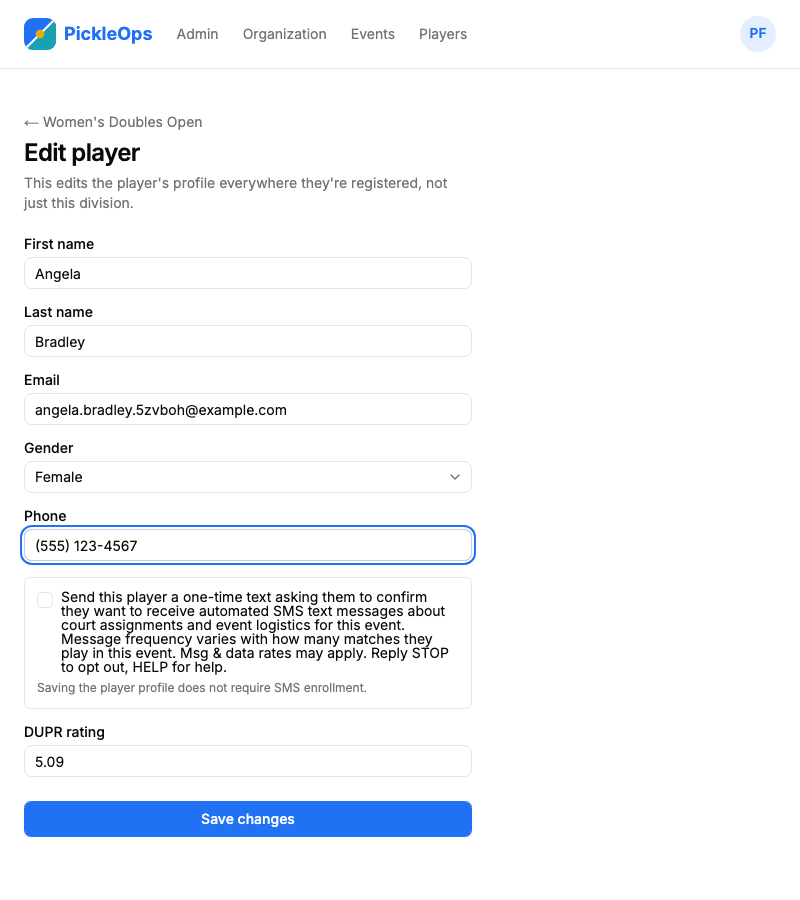
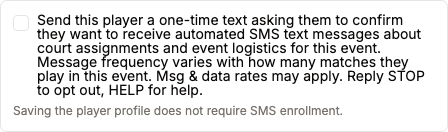
This is where a phone number first reaches PickleOps: an organizer, running their own tournament, enters a player’s phone number into that event’s roster. Saving this profile never sends anything by itself. A separate, optional, unchecked control is the only thing that starts Step 2 below, and the organizer has to affirmatively check it. The screen tells them plainly that saving the profile does not require SMS enrollment.
Close-up of that same control, so it’s unmistakable rather than buried in the full form:
Step 2: PickleOps sends a one-time opt-in request, unprompted
PickleOps for Lakeside Pickleball Club: Reply YES to confirm you want to receive automated SMS text messages about your court assignments and event logistics for Fall Championship 2026. Msg & data rates apply. Reply STOP to opt out.
Step 3: the phone number’s owner personally replies
YES
This is the entire opt-in action. Nothing else confirms consent, and nothing is assumed: if this reply never comes, no further texts are ever sent to this number for this event.
Step 4: PickleOps confirms the opt-in immediately
PickleOps for Lakeside Pickleball Club: You’re confirmed! We’ll text you court assignments and event logistics for Fall Championship 2026. Reply STOP to opt out, HELP for help.
Step 5: only now does a real court-assignment text ever go out
PickleOps for Lakeside Pickleball Club: Your match is on Court 4. Head to your court and start within 10 minutes. Reply STOP to opt out.
A court-assignment text is never sent to a number that hasn’t completed Step 3 above. Exactly when it arrives depends on what triggered Step 2: if an organizer used the optional “send opt-in now” button pictured in Step 1, ahead of any court being assigned, this example text is sent whenever an admin actually assigns that player’s match to a court, as its own separate message. If instead a court was already assigned to that player’s match at the moment they were first contacted, this example text is sent together with Step 4’s confirmation, in the same reply, so a player’s very first court assignment for an event still reaches them instead of waiting on a second one. A confirmed phone number stays confirmed for the rest of that one event only. A player who later plays a different organizer’s event goes through this same sequence again for that event, since the opt-in is specific to who’s texting them and why, not an open-ended subscription to every future PickleOps-run event anywhere.
SMS consent
No court-assignment SMS text message is ever sent to a phone number until that number’s owner has explicitly agreed to receive SMS text messages about that specific organizer’s specific event from PickleOps, by completing Steps 2-4 above. This is a standalone SMS consent, separate from and in addition to agreeing to PickleOps’s Terms of Service or Privacy Policy.
By replying YES to a PickleOps opt-in text, you expressly agree to receive automated SMS text messages from PickleOps, sent on behalf of the named organizer, letting you know which court your match has been assigned to and other event logistics for that one event. Consent is not a condition of participating in any event. Message frequency varies with how many matches you play in that event. Message and data rates may apply. Reply STOP at any time to stop receiving these messages, or HELP for help.
Message frequency
Message frequency varies. A player only receives a text when a court is assigned to one of their matches in the event they opted in for, so volume is tied to how many matches they play in that event.
Fees, help, and opting out
Message and data rates may apply, depending on your mobile carrier plan. Reply “STOP” at any time to a PickleOps text to stop receiving them, or “HELP” for help.
Your phone number and privacy
Your phone number is used only to send you the court-assignment texts described above, through our SMS provider, Twilio. It is never shown on any public page, never used for marketing, and never shared with anyone else. See our full Privacy Policy for details.
Terms of Service
These Text Messaging Terms are part of, and should be read alongside, our full Terms of Service.